
Scammers are using public information to make fake payment requests feel legitimate. Here’s how to spot them and what to do if one lands in your inbox.
How These Scams Work.
Picture this: during a busy workday, you get an email from your organization’s president asking you to cover a small expense by wire transfer while they’re out of the office. The name is right. The topic sounds normal. The only thing off is the email address, and it’s easy to miss.
This is spear phishing, and it’s becoming more common for businesses, nonprofits, and boards of all sizes.
What is Spear Phishing?
Spear phishing is a phishing email tailored to a specific person. It uses real names, titles, and organizations, so the request feels routine. When the goal is a payment, it’s called Business Email Compromise (BEC). Security experts rank it among the most costly online crimes, with tens of billions of dollars lost worldwide over the past decade.
These attacks don’t require a data breach at your organization. Names and titles are often published on websites, in newsletters, and in news coverage. Scammers pair that public information with personal email addresses leaked in unrelated data breaches, then send the same script to many people. Former board members and volunteers are especially attractive targets. They know the names involved but no longer see day-to-day operations, so an unusual request is harder to gut-check.
Spear phishing is also getting harder to spot as AI makes scam emails more polished and personal. For more on how AI impacts phishing, read Why You Can’t Treat Phishing Emails the Same Anymore.
A Look Inside a Spear Phishing Email.
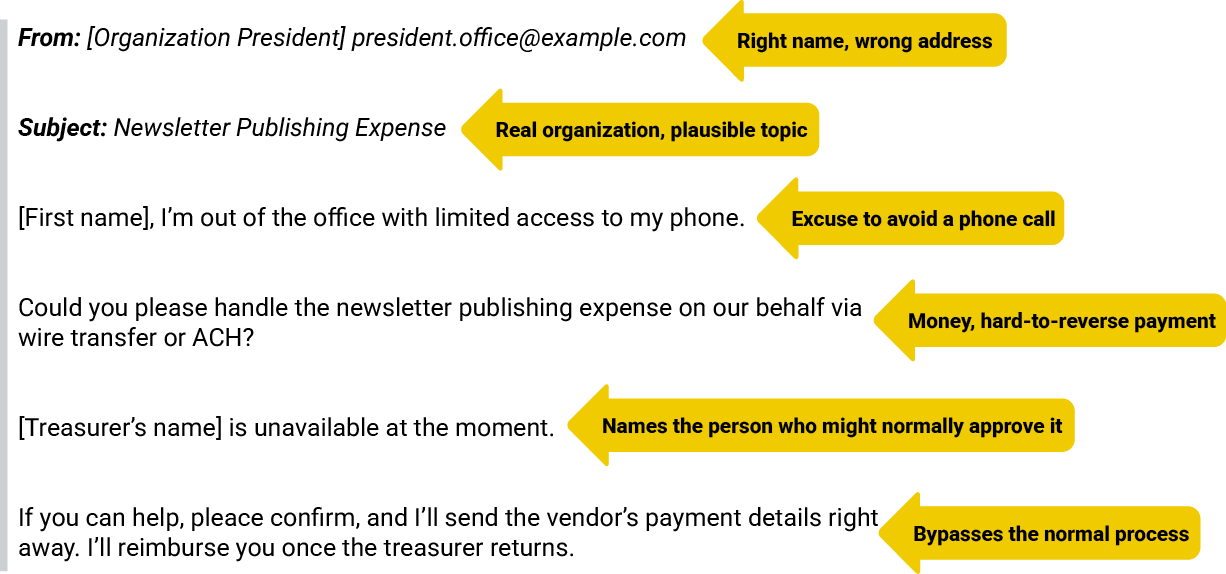
Here’s an example of a typical spear phishing email, with the warning signs noted.
Red Flags.
Any one of these is a reason to slow down. Two or more together almost always means a scam.
The address doesn’t match the name. The display name is right, but the email address is a free account like Gmail or Yahoo, or a look-alike domain.
Urgency or secrecy. Phrases like “right away,” “before end of day,” or “keep this between us.”
An excuse to avoid talking. “I’m in a meeting,” “limited access to my phone,” or “traveling.” A sender who won’t take a call is one of the strongest warning signs.
Money moving outside normal channels. Wire transfers, ACH, gift cards, or “pay it and I’ll reimburse you.”
Going around the usual approver. The message explains why the treasurer or office staff can’t be involved.
New or changed payment details. A new vendor, a new bank account, or “updated” wire instructions.
Small things are off. A generic signature, no phone number, odd phrasing, or a tone that doesn’t sound like the person.
A Few Quick Tips.
Check the real sender address. Anyone can type any name into the “From” field. Check the full address, especially on your phone, where it’s often hidden.

Don’t hit Reply on money requests. Start a new message and type the address you already know, or pick it from your contacts. That way, a look-alike address can’t intercept your response.
Verify by phone. Call the person at a number you already have. Never use a phone number from the suspicious email.
Stick to your approval process. No one should be asked to pay an organization expense personally and get reimbursed later.
Protect your email account. Turn on two-step verification and use a password for your email that you don’t use anywhere else.
Know your organization’s domain. Emails from within your organization should always end with your internal domain.
Report it, don’t just delete it. Each report helps your team warn others and track the scam.
Reach out. If you’re unsure about a message, connect with Dakota IT, and we can help you determine whether it’s legitimate.
If You Already Responded.
If you replied, clicked a link, or entered a password, change your email password right away, turn on two-step verification, and let your IT team know, so they can check for related activity.
If you sent money, act fast. Call your bank’s fraud department immediately and ask them to recall the transfer. Banks can sometimes freeze or recall a wire, but only if they hear about it quickly. Then file a complaint with the FBI’s Internet Crime Complaint Center at ic3.gov, whatever the amount.
The Golden Rule.
Never send money, change payment details, or share login information based on an email alone, no matter who it appears to come from. A real request will survive a five-minute delay. Pausing to verify by phone or in person is the single most effective habit for stopping spear phishing, and it costs nothing.
Spear Phishing Is Designed to Feel Normal.
That’s what makes it effective. A familiar name, a routine request, and a believable excuse can catch anyone off guard, especially on a busy day. The good news is that stopping it doesn’t take technical expertise. Check the address, slow down when money is involved, and verify through a channel you already trust. Make sure your team is familiar with the red flags. A scam only has to work on one person, so the more people who can spot it, the harder your organization is to fool.